
Wisanna Web Platform Guide
The Web Platform (legal.wisanna.com) is optimized for "Day 0" work: researching new issues, brainstorming strategies, and drafting documents from scratch.
1. Projects & Organization
Keep your work organized by client or matter.
- Create Projects: Group related chats and drafts. Naming convention recommendation:
Client – Matter – Phase(e.g., "Acme – Supply Agreement – Negotiation"). - Search History: Easily find past research or drafts within project folders.
2. AI Chat & Drafting
The core of the web platform is the conversational interface. Use the Prompt Library for general templates, and the Web Platform Prompt Packs for practice-area examples.
Capabilities
Jump straight into a practice-area prompt pack:
Corporate / Contracts
Limitation of Liability drafting + indemnity rewrite.
Open Pack →Litigation / Disputes
Merits analysis + urgent interim relief strategy.
Open Pack →Family Affairs
Parenting arrangements clause pack + prenup risk review.
Open Pack →Quick Prompts
Client email + MSA issues list (demo-friendly).
Open Pack →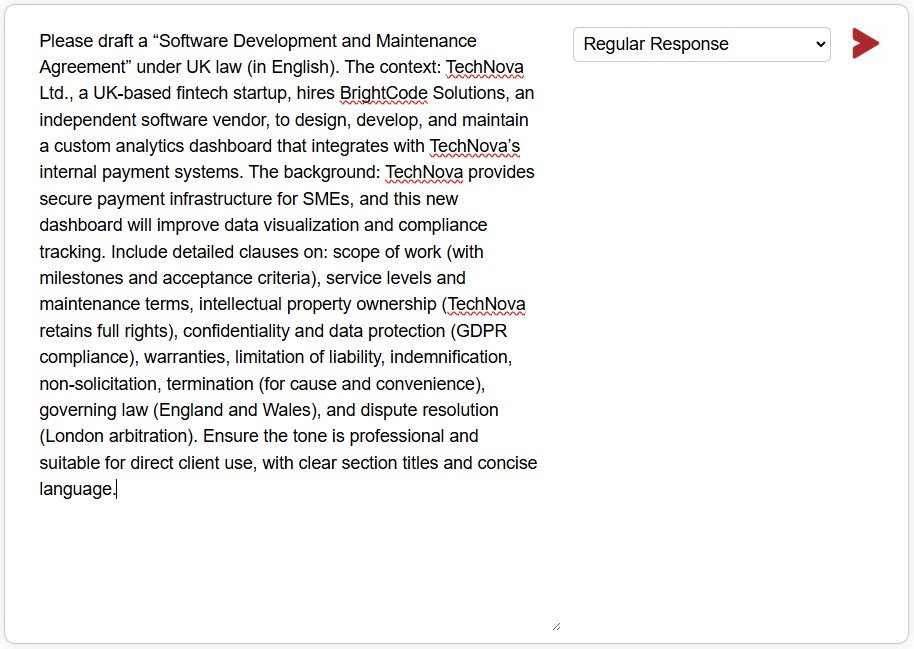
3. Export to Word
Once you have generated a draft or a research memo, you need to move it to your production environment.
- One-Click Export: Look for the Word icon (W) at the bottom of any AI response.
- Formatted Output: The export preserves headings, bullet points, and basic
formatting, creating a clean
.docxfile ready for editing. - Continue in Word: Open the downloaded file and use the Word Add-in for further refinement.
4. Language Settings
Wisanna supports multiple interface languages and drafting languages.
- Interface: Switch between English, Hebrew (עברית), and Romanian (Română) in the settings.
- Drafting: You can instruct Wisanna to draft in any major language, regardless of the interface setting.